RD Workflow
Congenica
If you use Congenica as your DSS, please bear in mind the following information:
- Rare disease referrals will not be dispatched to Congenica after November 2, 2026.
- Please complete and close existing cases in Congenica by February 28, 2027 as Congenica is planned for retirement on March 31, 2027.
Checking Consent
Before a rare disease referral is registered in the CIP-API, patient consent (also referred to as patient choice) must be verified for each individual in the referral.
- If any patient within the referral lacks valid consent, the referral will be blocked and will not appear in the Interpretation Portal.
- These referrals will also not be dispatched to any Decision Support System (DSS).
Dispatching to the DSS
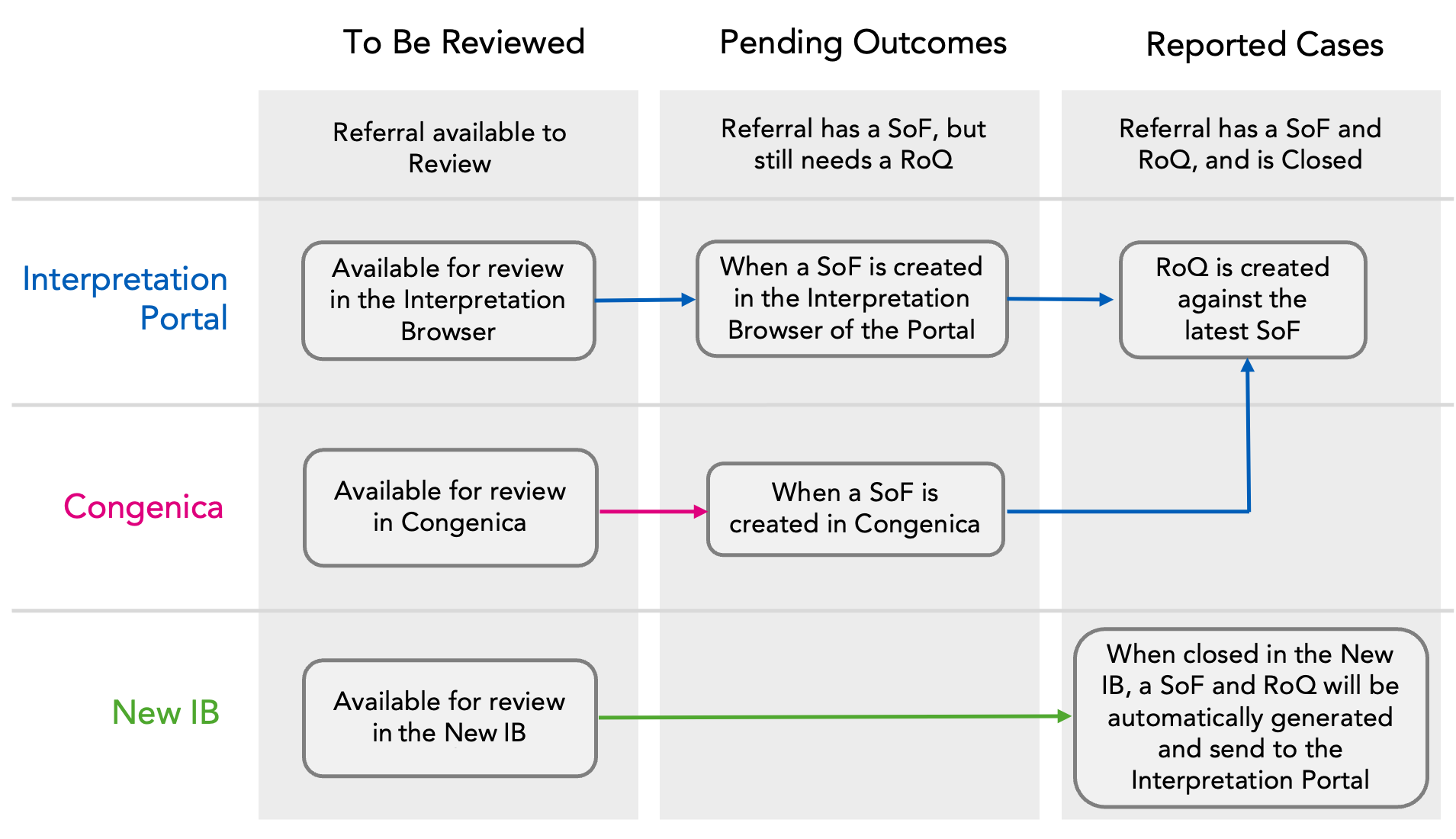
Once successfully dispatched into the New Interpretation Browser (New IB), the referral moves to the To Be Reviewed tab. To confirm ingestion, check the workflow status and the corresponding DSS linkout in either the Referrals Grid or on the individual Referral Page.
If the dispatch of the referral fails (e.g., due to a technical issue), it remains in the Ready to Dispatch tab. If you suspect a dispatch issue, please notify the Genomics England Service Desk.
Rare disease referrals available in the GMS Portal before and until 02/11/2026
- Rare disease referrals will be available in Congenica and the New IB.
- Workflow statuses related to Congenica and the New IB will be displayed in the Referrals Grid and Referrals Page.
- Linkouts to Congenica and the New IB will remain available and active on the Referrals Page.
Rare disease referrals available in the GMS Portal after 02/11/2026
- Rare disease referrals will be available only in the New IB.
- Workflow statuses related to the New IB only will be displayed in the Referrals Grid and Referrals Page.
- Linkouts to the New IB and Congenica will appear on the Referrals Page. However, only the linkout to the New IB will be active. The linkout to Congenica will be visible but disabled.
Creating a Summary of Findings
To begin analysis and document findings, users must generate a Summary of Findings (SoF), also known as a Clinical Report in the CIP-API.
- This can be done in either the Portal's Interpretation Browser, Congenica, or the New IB.
- Until an SoF is created, the case remains in the To Be Reviewed tab.
- Once created, the case progresses to the Pending Outcomes tab.
New Interpretation Browser
If a case is closed in the New IB, the SoF, RoQ, and Variant Interpretation Logs (VILs) are automatically sent to the Portal. These cases are moved directly to Reported Cases, and users do not need to manually complete an RoQ in the Portal.
Completing the Reporting Outcomes Questionnaire
To close a case and record clinical outcomes, users must complete a Reporting Outcomes Questionnaire (RoQ), also referred to as an Exit Questionnaire.
- Upon completion, the case moves to the Reported Cases tab in the Interpretation Portal.
New Interpretation Browser
If a case is closed in the New IB, the SoF, RoQ, and Variant Interpretation Logs (VILs) are automatically sent to the Portal. These cases are moved directly to Reported Cases, and users do not need to manually complete an RoQ in the Portal.
Updating a Closed Referral
To correct errors or update classifications (e.g., due to a new Diagnostic Discovery Finding) for a previously closed case in CVA via the Interpretation Portal or Congenica, follow these steps to ensure the accuracy and completeness of case data:
-
Create a New SoF
- Generate an updated SoF in the Interpretation Portal or Congenica.
- This reopens the referral, moving it back to the Pending Outcomes tab.
- A new SoF version will appear on the Referral Page.
-
Complete a New RoQ
- Submit a corresponding RoQ for the updated SoF.
- This ensures the referral is properly re-closed with the latest information.
Consent Re-Check
When downloading the report, Patient Choice is re-verified to ensure ongoing consent compliance.
New Interpretation Browser
Referrals can also be updated directly in the New IB. Please refer to their support documentation for guidance.
Case Archiving
To improve performance and resource efficiency, Congenica and the New IB automatically archive inactive cases after a defined period (see the GUI-EXT-011 Genomic Laboratory Hubs (GLH) Congenica User Guide on NHS Futures or the New IB support documentation for details).
- To access an archived case, it must be unarchived within Congenica or the New IB.
- Unarchiving may cause the case to reappear in tabs such as To Be Reviewed and may trigger daily email notifications